Remove image background — 100% private, no upload
Drop in a photo, get back the same photo with the background gone. Works on portraits, products, pets, anything with a clear subject. Everything runs in your browser — your image is never uploaded.
JPG, PNG, WebP up to ~6 MP recommended.

Example: before and after
A real run of this tool — a parrot photo processed entirely in the browser, nothing uploaded anywhere:
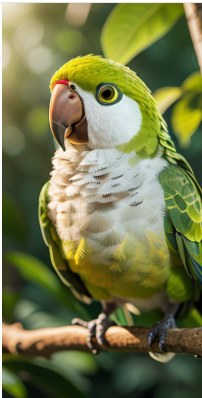
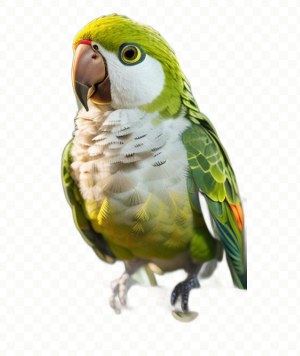
The cutout keeps soft edges around the feathers and claws. The checkerboard marks transparent pixels — download the PNG and it drops straight onto any background.
Tips
Best results when the subject is the only sharp thing in the frame — clean edges, no clutter behind. For group shots, try cropping to one person first. Output is a transparent PNG you can drop onto any background in your design app.
How it works
The tool runs an image-segmentation neural network directly in your browser using WebAssembly and ONNX Runtime. When you drop in a photo, the model analyses it and predicts which pixels belong to the subject and which belong to the background, then produces a clean cutout with soft edges — all locally, with no upload. Your images are not sent to any server, which makes it safe for product photos, personal pictures, and documents alike.
Tips for cleaner cutouts
- Use photos where the subject stands out clearly from the background.
- Even, front-facing lighting produces far fewer halo artefacts than backlighting.
- Keep some margin around the subject rather than cropping tight beforehand.
- The "small" model is fast and handles most portraits and product shots; for busy scenes, a higher-quality source photo matters more than any setting.
The first run is slower — that is normal
On first use the browser downloads the segmentation model (tens of megabytes) and caches it. Subsequent runs start in seconds because the model is already on your device. If the first run seems stuck on a slow connection, give it a moment — the progress indicator shows the download.
FAQ
Is there an upload or size limit?
No upload exists at all, so there is no server-side limit. Very large images are scaled internally to what the model can process efficiently.
Does it work on phones?
Yes, on reasonably modern devices. The first run downloads the model, so use Wi-Fi if your mobile data is limited.
Can I get a transparent PNG?
Yes — the removed-background output keeps transparency, so you can download and composite it onto any backdrop.
Does this work with confidential or client photos?
Yes — that is exactly what it is built for. Because the segmentation model runs on your device, you can process a passport photo, a product shot under NDA or a patient scan without your compliance team having to approve a third-party processor. There is no upload step to audit, because there is no upload.
Can I use it with the internet switched off?
Once the page and the model have loaded, yes. Disconnect and the cut-out still runs, because nothing in the pipeline needs a server. That is the simplest way to verify our no-upload claim yourself: pull the network cable and watch it keep working.
People also use this for…
Every tool below is also 100% local: no upload, no account, no server copy — the same privacy guarantee you get on this page.
- Put several cut-outs into a single PDF
You removed the background — now combine the results into one document. - Edit or repair a photo inside a PDF
Cover, replace or clean up images without re-uploading the whole file. - Match the colour you just removed
Find the exact HEX/RGB value of the background so the replacement blends in.
How to remove a background from an image
- Click the picker and choose a photo — JPG or PNG, ideally under 10 MB.
- Wait for the one-time setup on your first run: the segmentation model and the WebAssembly runtime are downloaded to your browser, roughly 55 MB in total. Subsequent runs start in a second or two because they are cached.
- Processing takes a few seconds on a modern laptop, longer on a phone. The progress bar reflects the real download and inference stages.
- Preview the cut-out, then download it as a PNG with a transparent background, ready to drop into a design, a listing photo or a document.
How it works: a real neural network, running on your device
This is not a colour-key or an edge-detection trick. The page runs a pre-trained image segmentation model (an ISNet architecture) that has learned to separate a subject from its surroundings. The model is executed by ONNX Runtime for Web, a WebAssembly build of a standard ML inference engine, using your device's own CPU. That is why the first visit needs to fetch the model, and why nothing is uploaded: your photo is turned into pixels in your browser, the model produces a transparency mask, and the mask is applied to produce the cut-out. The download is a one-way fetch of model weights — your image never travels in the other direction.
Getting the best results
Segmentation quality depends mostly on the photo. These consistently do well:
- A single, clearly defined subject — a person, a product, a car, a piece of furniture.
- Good contrast between the subject and the background.
- Reasonable resolution: roughly 800–2000 pixels on the long edge is ideal. Tiny images lack detail; very large ones are slow without improving the mask.
- Even lighting, so the subject's outline is unambiguous.
These are harder, and will usually need touch-ups afterwards:
- Fine detail such as flyaway hair, fur, feathers, veils or smoke.
- Transparent or reflective objects — glassware, water, shiny packaging.
- Subjects that share a colour with the background (a white product on a white wall).
- Several overlapping subjects, where the model has to guess what counts as "the" subject.
Privacy: why this matters more than usual
Most free background removers upload your photo to a server, process it there, and keep a copy — often for days, sometimes to train their next model. For product photos that is a commercial risk; for photos of people, children or documents it is a privacy one. Here the file is read locally with the File API and the model runs on your own hardware. Nothing is uploaded, nothing is stored, and there is no account. Once the page is loaded you can even disconnect from the network and it will keep working.
Troubleshooting
- First run takes 30 seconds or more: that is the model download. Later runs are much faster. Do not close the tab mid-download.
- Fails immediately with a module error: the library comes from a public CDN. If a proxy, firewall, ad blocker or privacy extension blocks it, allow cdn.jsdelivr.net and reload.
- Progress stalls at 100% or crashes: the image is too large. Resize it to around 1500 pixels on the long edge and retry.
- Edges look rough or haloed: try a higher-contrast original. The output is a single-pass model result, not a manual mask.
- Console warns about threads: a harmless notice that multi-threading is unavailable. It falls back to single-threaded inference, which is slower but identical in quality.
- Works on desktop, slow on phone: expected — inference runs on the device's CPU. Give it a moment.
More questions
Is the image really not uploaded?
Correct. The only network activity is fetching the model and runtime to your browser. You can verify this in your browser's developer tools: no request ever contains your file.
What format is the output?
PNG, because it is the common format that supports an alpha (transparency) channel. JPG cannot store transparency, so a transparent JPG does not exist.
Can I process many images at once?
One at a time here, to keep memory use predictable. Batch processing would need a queue and a lot more RAM.
Do I need a powerful computer?
Any machine from roughly the last six years is fine. There is no GPU requirement and no special hardware support needed.